2025-2026
Documentation and links for the STORM 2026 robot Pink Blush.
STORM Resources / Links
General
- Any FRC or FIRST Tech Challenge match videos. Recommend looking up "frc world finals 2025".
- Game Manual 0 has good overall resources for FTC-like competitions.
- All of the onboarding materials can be found here.
- The FIRST Robotics Competition documentation can be found here. You don't need to worry about doing anything they mention, but some pages explain certain robotics concepts nicely.
- You can find previous year's design reports from other teams (including SCR) on the STORM website.
- The FRC/FTC forums at Chief Delphi can be useful as well. If there's a robotics problem, it has likely been encountered and solved by some FTC or FRC team.
Mechanical
- The vendors we will typically buy stuff from are REV Robotics, goBILDA, AndyMark, Vex, West Coast Products, The Thrifty Bot, and McMaster-Carr.
- Guides for goBILDA's products can be found on their individual product pages. It is likely we will be using mostly goBILDA products.
- Guides on how to use REV's parts can be found here.
- Guides for goBILDA's products can be found on their individual product pages. It is likely we will be using mostly goBILDA products.
- We use OnShape for 3D-modeling, and [Bambu Studio] for slicing and 3D-printing parts. You can find tutorials for both online, I think.
- Again, Game Manual 0's Common Mechanisms page is a good start.
- There's a lot of good calculators and other tools on the OnShape4FRC site.
- The JVN Design Calculator is a standard tool in FRC (and sort of FTC) for calculating things with gears and wheels and motors. We will probably be using the same/similar motors.
Electrical
- We will be using Altium to design circuit boards.
- we should have [wiki pages] on this, I need to find them though
- For making simpler circuits, or just prototyping things, TinkerCAD has a circuit designer where you can test out circuits (ECE-3813 Introductory Electronics even uses this for projects!).
- If you need to find a sensor/IC/other electrical component, look at AdaFruit, DigiKey, and Mouser.
- Texas Instruments has ICs too.
- SCR has historically been one of the best electrical orginzations on campus. If ever in doubt, just ask a question in the discord and an alumni/current member will be able to help.
Software
- If you have absolutely no programming experience at all, try and find a good YouTube course. We will mostly be using C++ and Python, so look for one of those.
- Python is the easiest to pick up, and widely used in data science and AI. A good Python book is "Python Crash Course" by No Starch Press.
- C++ is harder, but widely used in robotics and embedded systems, a good tutorial can be found [here].
- If you have a programming question or problem, it's probably been solved on Stack Overflow.
- Alternatively, ask in the discord and someone can help!
- If you just want to get more familiar with how robotics code works, many FRC and FTC teams (and probably VEX and BEST as well) have their code available online. Just look up "FRC code" and you can probably find some team's repository (although some of the big teams can do very advanced and hard to understand things).
- If you want robotics examples in Java, take a look at some of Daniel's old FTC code here.
- All of SCR's code can be found publicly on our GitHub. I would recommend looking at last year's STORM code, and if you're feeling adventerous look at autonav's code as well.
- For simulator work, take a look at the scrabby repository. The Unity docs are generaly full of information, and it's widely enough used that you can often find an answer online.
Design Report
The design report for Pink Blush can be found on the Google Drive.
Note that the design report was due 2 weeks before competition, and a lot of work was done over those 2 weeks to get the robot up and running, so the design report does not necessarily reflect the condition Pink Blush was in when it competed. Notably, the addition of a climbing mechanism (which worked to great effect) and charging wheel mechanism, a complete redesign of the Operator Interface (GUI), and significant other software work.
{TODO: link to the design report on like, the SCR website and STORM website once they both get updated}
Mechanical
{insert CAD pictures and explanation and sketches and design history here}
{also include a BOM (maybe need to make a chapter to hold all the mechanical stuff or something}
Electrical
The original electrical design for this year looked like this: {insert diagram and explanation here}
However, declining electrical membership and time constraints forced us to combine everything into one mega-PCB, with an architecture shown below: {insert diagram and explanation here}
{insert Electrical Architecture document here}
Software
Architecture
The planned software architecture was different than what we actually ran at competition, but you can find the Software Architecture document on the Google Drive. Also check the design report.
{TODO insert graphics}
Competition Code
What we actually ran at competition can be found on the GitHub. Instructions for running the code are there on the README.
Firmware
The firmware is also on the GitHub, inside the firmware folder.
Operator Station
{TODO insert graphics}
Driving
If you are trying to drive the robot, see the Driving page.
Post-Mortem
The full post-mortems can be found in {this} folder on the google drive, but the key takeaways are listed below:
TODO
Driving
Setting Up
If the "test mode" script has not been set up to run automatically, then you will have to do that yourself. Try and follow the README on the GitHub to get the code running.
Driving
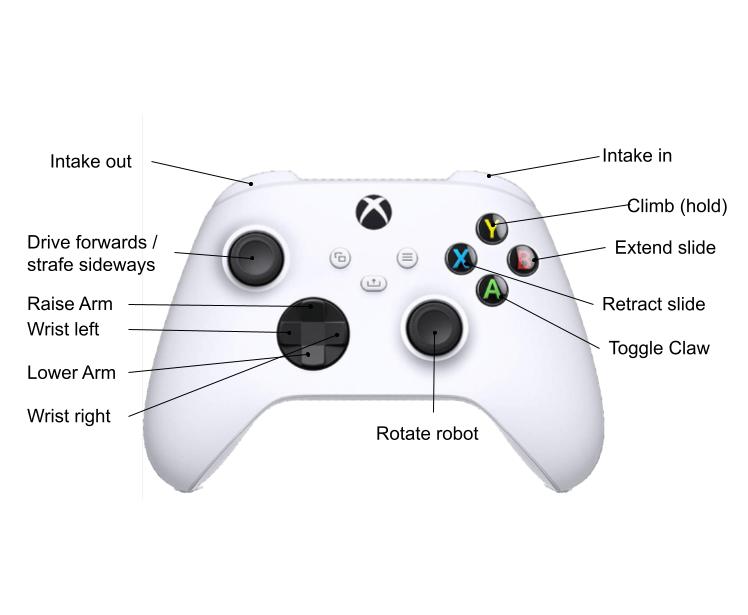
If the script is already set up and runs on boot, then all you need to do is plug a battery into the electronics power, plug a battery into the motor power, un-e-stop Pink Blush, turn on the STORM Xbox controller, and you're good to go!
A copy of the button bindings at time-of-writing is included below.